Python Filters#
Python filters run Python code using the Python interpreter.
Installing Python#
Before you can run Python filters, you will need to install Python.
Warning
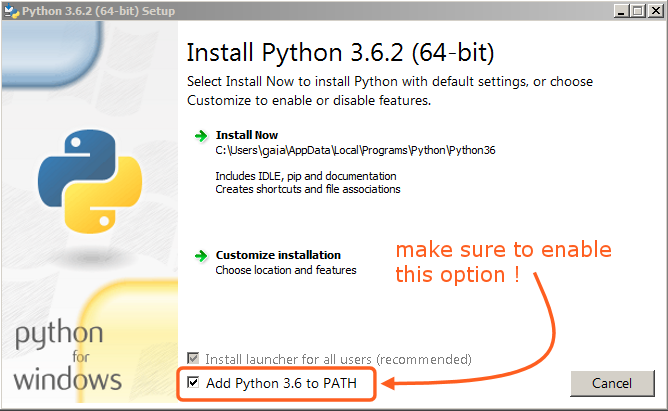
Please ensure that you add Python to your path:
Warning
Avoid installing Python via the Microsoft Store. Python installed from here is not available on the path. If you have trouble running Python filters with Regolith, please reinstall using the link above.
Python Filter Definition#
The structure of the Python filter definition is described below. You can read how to use it in the Filter Definition section.
{
  "runWith": "python",
  "script": "./filters/example.py",
  "requirements": "./filters/requirements.txt",
  "venvSlot": 0
}
runWith- always set topython, marks this filter as a Python filter.script- path to the.pyfile that contains the Python program to run.requirements(optional) - a property that defines the path to the file with the dependencies. By default, Regolith looks for therequirements.txtfile in the same folder as the script.venvSlot(optional) - a property that lets you install the dependencies of different Python filters into different virtual environments. By default, all filters share a single venv with the id of 0. More details in the Venv Handling section below.
Requirements and Dependencies#
The dependencies of a Python filter are defined in a requirements.txt file. You can read more about the requirements.txt file in the Python documentation. The Python filters expect the dependencies to be installed from requirements.txt file located in the same directory as the script file unless specified otherwise in the requirements property.
Venv Handling#
Warning
You shouldn’t use the venvSlot property inside the filter.json file. It is intended to be used in the config.json to organize the virtual environments of the project.
Python Venvs are flexible, lightweight “virtual environments”.
Regolith uses venvs to install dependencies to prevent your global installation space from becoming polluted. When you install a Python filter with dependencies, they will be installed into a venv, stored in project cache in cache/venvs/.
By default, all filters will share a single venv. This speeds up the installation process.
In rare case of conflicting dependencies between filters, you may want to install them into separate venvs using the venvSlot property. You will need to reinstall the filter.
Note
The venvSlot property is also available in config.json file in the remote filter definitions. If you specify it there, and the filter from the URL uses Python, all of its dependencies will be installed in the venv specified in the config.json file.